Report Templates, Data Sets and Dashboards can be exported to copy them from one WinSPC system to another. This allows you to share these exportable objects with other WinSPC users, as well as download new report templates from DataNet Quality Systems for use in your WinSPC environment. This also gives you an option to save these objects' settings outside of the WinSPC database.
An export of any one of the following objects in WinSPC produces a single file that then can be imported into a WinSPC database all at once:
Report Template Folder
Report Template
Data Set Folder
Data Set
Dashboard
Dashboard Folder
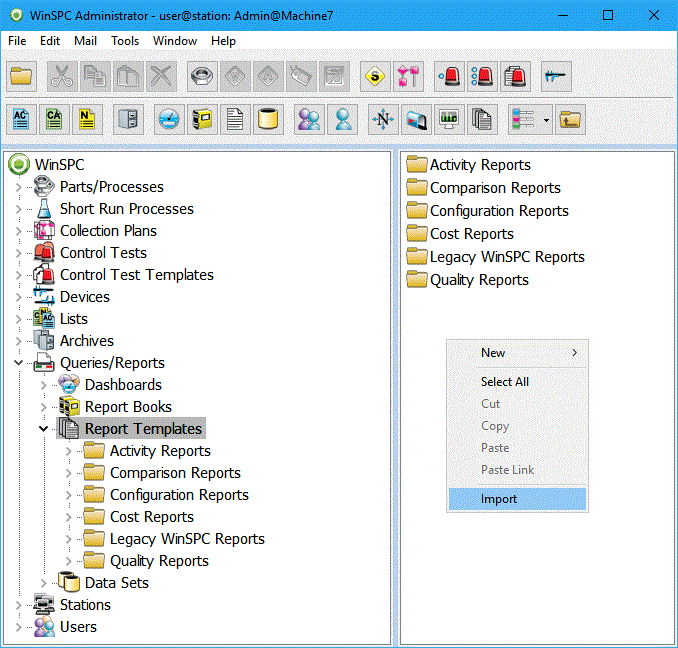
To import a any of these exportable formates, simply right click in the white area where you wish to import the item and select the "Import" menu option:
You should be in the appropriate area for the type of item you are importing (i.e., you should be in the "Report Templates" area of the WinSPC Administrator tree if you are importing Report Templates). Browse out to the export file location and then click "Open". The object will then be imported, automatically generating any Folders, Report Templates, Data Sets, or Dashboards that are contained within that export file.
NOTE: Exports of Report Templates, Data Sets and Dashboards are not intended to be imported across different WinSPC versions. Therefore, a Report Template exported in an older version of WinSPC may not import after an upgrade. If you have an export file that was generated in a previous version of WinSPC and you would like to import into a newer version of WinSPC, you can contact DataNet Quality Systems' Product Support Help Desk to assist you with a export file upgrade.


 Search the WinSPC Knowledgebase
 Browse by Category
 The article has been updated successfully.